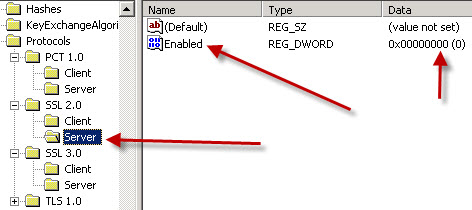
SSL Weak Encryption Algorithms – how to disable them under IIS
Chances are if you are reading this you’ve failed a “Trustkeeper Scan” – with “Low severity” – due to having weak SSL encryption algorithms enabled on IIS.
It’s pretty easy to solve this, but if you read the microsoft KB article it looks pretty complicated.
Launch regedit and go to this key:
HKEY_LOCAL_MACHINE\SYSTEM\CurrentControlSet\Control\SecurityProviders\SCHANNEL\Ciphers
You basically want to disable everything that has less than 128 bit encryption. On one of my servers, the ones with red arrows below need to be disabled:
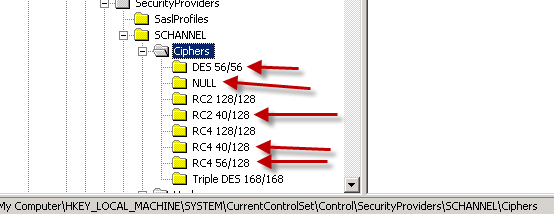
CLICK FOR LARGER IMAGE
So on each one of these, you want to “Right click”, add a DWORD, name it “Enabled” and set the Hex value to 00000000 (eight zeros).
Repeat for each one that has less than 128 bit length, and then restart your server.
You probably also need to reschedule a security scan so that your changes can be verified, and as always, please double check your SSL protected site with at least two different web browsers and make sure you can get into SSL mode with them both on your site.