How to get multiple xbox 360 consoles inside one LAN working properly
We recently added a second xbox 360 into our house and came across the dreaded NAT TYPE “moderate”. I needed both xbox’s to get to “OPEN” NAT type so that online multiplayer games will function perfectly, but had to invest multiple hours of time into the process to work it all out.
The main factor for me is that I need a firewall that supports both multiple game consoles, as well as the ability to do site-to-site VPN via the firewall.
I tried the following firewall setups:
- Watchguard XTM 33-W (latest firmware as of 12-31-2012). No Go. Tried multiple configurations, not able to get both XBOX’s to “open”. This included port mapping, adjusting content filtering, etc.
- Monowall. Latest version as of 12-31-2012. No go.
- Smoothwall Express 3 SP 3. No go.
- pfsense 2.02 – WORKED!
- Here is what I did:
- Install SATA drive into an Optiplex 745. Installed two Intel 1000GT desktop adapters.
- Download the pfsense LIVE ISO image and burn to a CD. In my case, the image name was pfSense-LiveCD-2.0.2-RELEASE-i386.iso.gz
- Boot the CD and install pfsense to the SATA drive.
- Configure pfsense (set the WAN and LAN adapters)
- boot pfsense, log into the web admin and make sure the house has internet connectivity. (it did).
- Make sure your xboxes are on DHCP (obtain IP automatically)
- in the web admin of pfsense, go to SERVICES->UPNP and configure as follows:
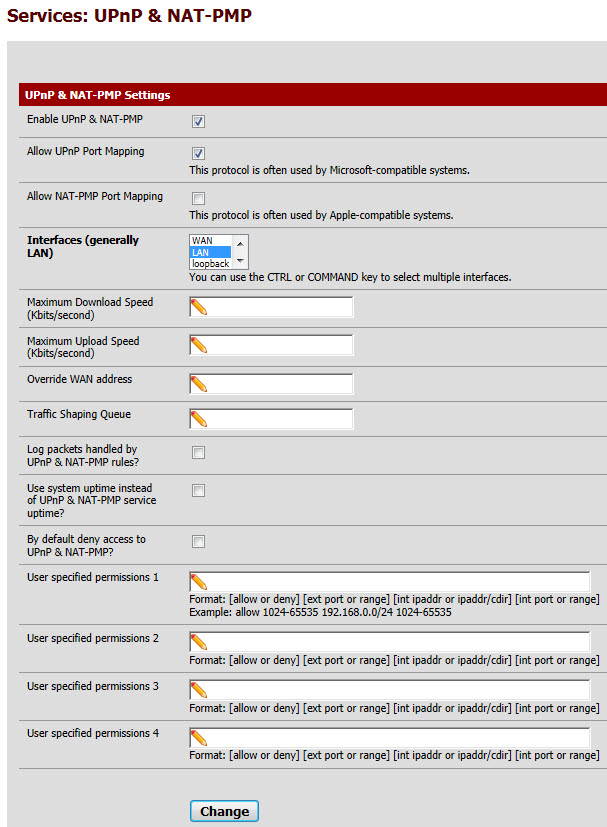
- click CHANGE.
- you can now play 2 or more Xbox 360’s inside your LAN without a problem.
- To look at the UPNP status, go to STATUS->UPNP. when your Xbox’s are online, you will see entries here for UPNP port mapping.
- Note: This will also work fine for the SONY PLAYSTATION PS3.
- To configure/Enable UPNP for the PS3:
- Settings/Network Settings/Internet Connection Settings/Yes
- Custom (Setting Method)
- Go through all menus (to the right) and the last page is ENABLE UPNP. Enable it.
- Test the connection and you should now have NAT TYPE 2.
- As far as the SONY PLAYSTATION VITA goes, I have not yet been able to get that to “NAT TYPE 2” — it does not as of firmware 2.02 on the Vita support UPNP, and I cannot use port mapping/port forwarding as that would interfere with the PS3 setup.
- Here is what I did:
If you are able to get a Playstation Vita working with NAT TYPE 2 using PFSENSE I would appreciate knowing your exact setup.
UPDATE April 26, 2013:
Upgraded to PFSense 2.0.3.
My current configuration (Which is working perfectly) is as follows:
1) DHCP server ON inside PFSENSE. Both XBOX’s assigned a static IP (VIA DHCP MAC ADDRESS RESERVATION) so that their internal IP’s stay fixed. (Note: One of my XBOX’s is a newer black wireless model, the other is an older White model with the USB Microsoft Wireless adapter). I use a high end MERAKI wireless access point to get them into my LAN.
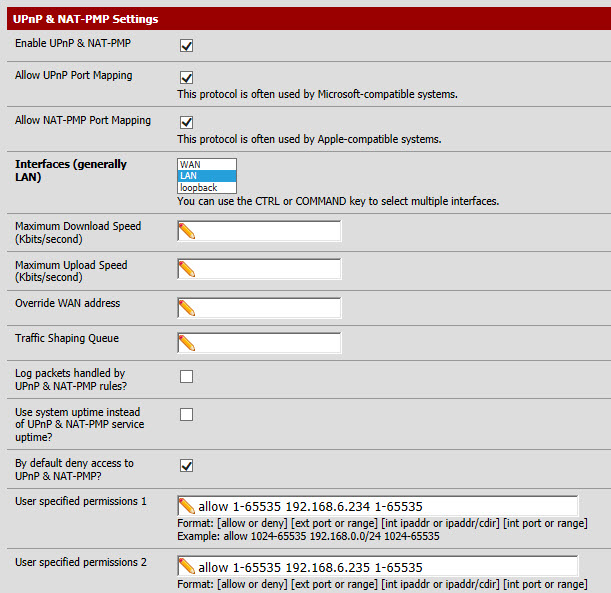
2) These are my UPNP Mappings (note my two XBOX’s are 192.168.6.234 and .234).
These settings work perfectly – OPEN NAT and my kids have played HOURS on this configuration.